Supercharge your GitLab setup with Roadie's Internal Developer Portal
By David Tuite • February 19th, 2026
Roadie's SaaS Backstage platform offers the deepest GitLab integration of any Internal Developer Portal, solving "GitLab Sprawl," the challenge of navigating hundreds of repositories without a unified software catalog, ownership model, or governance layer. GitLab itself acknowledges the gap: its own IDP category is officially "planned but not funded," with implementation pushed beyond 2025. For GitLab-centric organizations, Roadie provides a production-ready portal in hours rather than the 6 to 12 months required to self-host Backstage.
This guide covers every integration surface between Roadie and GitLab, from auto-discovery of catalog entities across hundreds of repos to CI/CD visualization, scaffolding new services, enforcing governance via scorecards, and securely connecting self-managed GitLab instances through the Roadie Broker.
Set Up Roadie with GitLab: A Step-by-Step Guide
Connecting GitLab to Roadie takes about 30 minutes. You'll create a token, configure auto-discovery to populate your Software Catalog, enable CI/CD visibility, and build your first scaffolder template.
Prerequisites
Before you start, make sure you have:
- Admin access to your Roadie instance (URL format:
https://<your-tenant>.roadie.so) - A GitLab account with permissions to create Personal Access Tokens
- Access to at least one GitLab group or project containing repositories.
Step 1: Create and Configure Your GitLab Token
GitLab uses Personal Access Tokens to authenticate API requests. Roadie needs this token to read repositories, discover catalog entities, and interact with CI/CD pipelines.
Backstage needs a GitLab API token for discovery and plugin data. Three token types exist, each with different trade-offs:
Group Access Tokens are the recommended choice for Backstage integrations. They create a bot user scoped to a specific group and all its projects, don't consume a GitLab license seat, and aren't tied to a human user (avoiding breakage when someone leaves the organization). They require GitLab Premium or Ultimate on SaaS. Personal Access Tokens (PATs) provide broader instance-wide access but inherit the creating user's permissions and break if that user is deactivated. Project Access Tokens are too narrow for discovery since you'd need one per repository.
The required scopes depend on the use case. For read-only catalog discovery and CI/CD visualization, read_api is sufficient. For scaffolder operations that create repositories and merge requests, the full set of api, read_repository, and write_repository is needed. Roadie stores tokens securely in its secrets management UI at https://<tenant>.roadie.so/administration/secrets, backed by AWS Parameter Store with per-tenant KMS encryption, rather than requiring them in plaintext config files.
Once you have your token, you can enter it into Roadie.
-
Log into your Roadie instance at
https://<your-tenant>.roadie.so -
Navigate to Administration > Secrets (direct URL:
https://<your-tenant>.roadie.so/administration/secrets). -
Find the secret named
GITLAB_TOKEN -
Click Edit and paste your GitLab token
-
Click Save
The secret update takes 2-3 minutes to propagate. You'll see the status indicator change from "Updating" to "Available" when it's ready.
Configure Auto-Discovery: eliminate manual catalog registration at scale
The core of any Internal Developer Portal is the software catalog. Without auto-discovery, teams must manually register every service, an approach that collapses at hundreds of repositories. Backstage's GitlabDiscoveryEntityProvider, packaged in @backstage/plugin-catalog-backend-module-gitlab, crawls a GitLab instance, finds repositories containing a catalog-info.yaml file, and registers them automatically.
In self-hosted Backstage, this requires editing app-config.yaml directly:
catalog:
  providers:
    gitlab:
      production:
        host: gitlab.com
        branch: main
        fallbackBranch: master
        skipForkedRepos: true
        includeArchivedRepos: false
        group: my-org                     # Scope to a specific group
        groupPattern:
          - '^platform-.*$'               # Regex: only groups starting with "platform-"
          - 'services'
        projectPattern: '[\s\S]*'         # Regex: match all projects (default)
        entityFilename: catalog-info.yaml
        excludeRepos:
          - my-org/deprecated-service
        schedule:
          frequency: { minutes: 30 }
          timeout: { minutes: 3 }
Roadie replaces this YAML editing with a UI-based configuration at https://<tenant>.roadie.so/administration/settings/integrations/gitlab. Admins add their GitLab instance URL, configure provider rules pointing to specific groups, and entities appear in the catalog within minutes.
The discovery provider supports powerful filtering through regex patterns. The groupPattern field accepts a list of regular expressions OR'd together to select which groups to scan. The projectPattern field applies a regex against each project's path_with_namespace. A legacy discovery processor also exists using wildcard URLs (https://gitlab.com/group/subgroup/blob/*/catalog-info.yaml, where * resolves to each repo's default branch), but the entity provider approach is the current recommended pattern.
For near-real-time updates, the provider supports webhook-driven ingestion, configure GitLab push webhooks to trigger incremental catalog refreshes instead of waiting for scheduled polls. Events can be received via HTTP endpoints, AWS SQS, Google Pub/Sub, or Kafka through @backstage/plugin-events-backend-module-gitlab.
To set up auto-discovery:
-
Navigate to Administration > Integrations & Plugins > GitLab (direct URL:
https://<your-tenant>.roadie.so/administration/settings/integrations/gitlab) -
In the Host field, enter your GitLab instance URL:
- For GitLab.com:
gitlab.com - For self-hosted: Your full domain (e.g.,
gitlab.company.com)
- For GitLab.com:
-
Leave API Base URL with the default vaule unless you're using a custom API endpoint
Now, you’ll need to add a discovery provider in Roadie. The discovery provider tells Roadie which GitLab groups or projects to scan for catalog files.
-
In the same GitLab integration page, scroll to Configure GitLab Discovery
-
Click Add Provider Configuration
-
Configure the provider. At the very least, you’ll need to enter your group name. You can also add filters to refine discovery. For example, you can add a project pattern.
-
Click Save
The discovery process runs every hour by default. To trigger an immediate scan, you can refresh the catalog or wait for the next scheduled run.
For Roadie to link catalog entities to GitLab data, you need to add GitLab-specific annotations to your catalog-info.yaml files.
Add one of these annotations to your entity metadata:
apiVersion: backstage.io/v1alpha1
kind: Component
metadata:
  name: my-service
  annotations:
    # Option 1: Use project ID (found in Settings > General in GitLab)
    gitlab.com/project-id: '12345'

    # Option 2: Use project slug (group/project format)
    # gitlab.com/project-slug: 'acme-corp/my-service'

    # Option 3: For self-hosted GitLab instances
    # gitlab.com/instance: 'gitlab.company.com'
The project ID is the most reliable option. You can find it in your GitLab project under Settings > General at the top of the page.
Now, auto-discovery should be enabled, and your catalog will be populated with projects from GitLab.

CI/CD visibility and contextual linking to GitLab
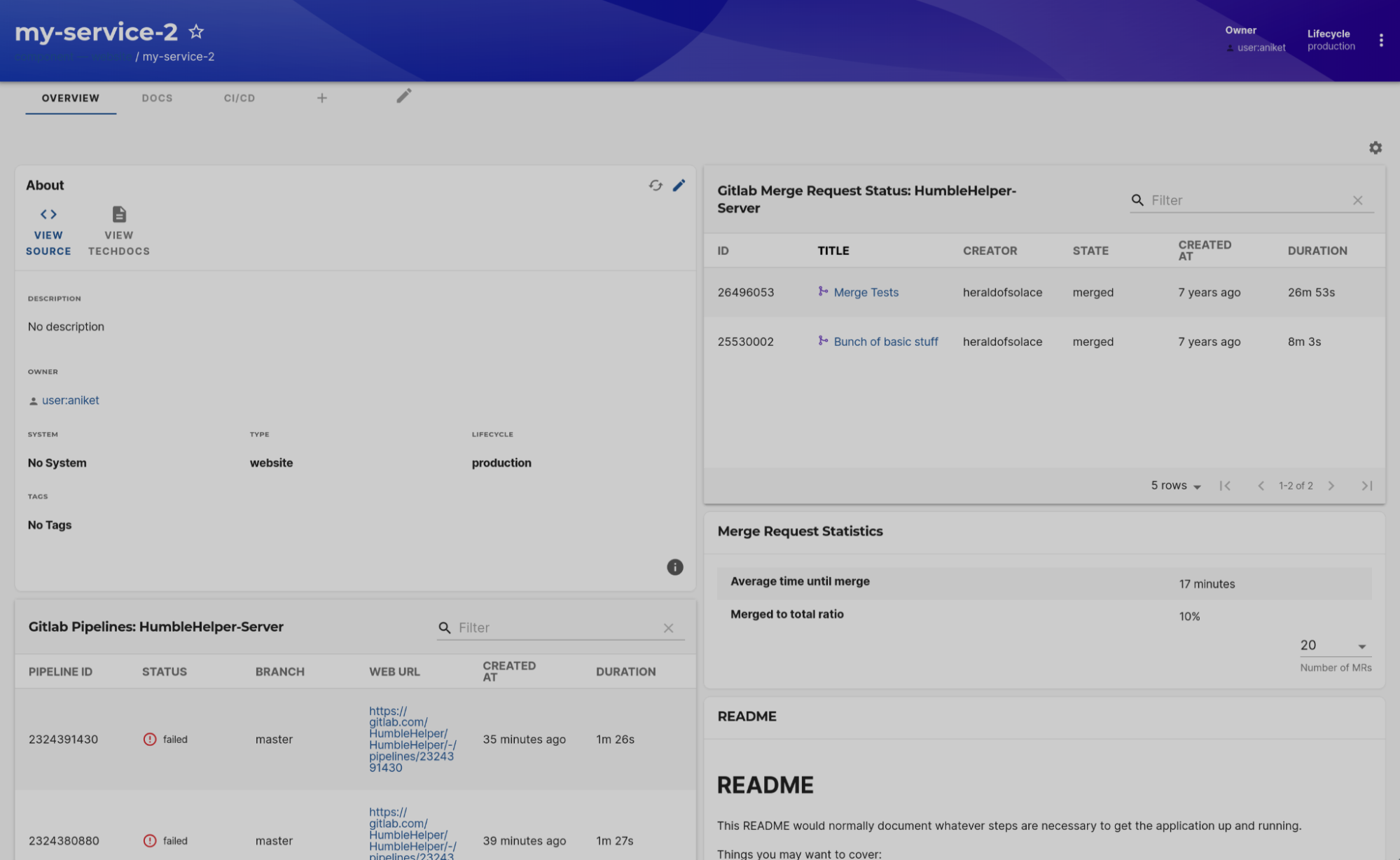
Once entities are cataloged, the @immobiliarelabs/backstage-plugin-gitlab provides rich GitLab data directly on each component's page in Backstage. This plugin reads the gitlab.com/project-slug or gitlab.com/project-id annotation and calls the GitLab API via a backend proxy to surface:
- Pipeline status table showing the last 20 builds with status (success/failed/running/pending), direct links to the GitLab pipeline URL, and execution time
- Merge requests table with open and recently merged MRs, linking directly to GitLab
- MR statistics for review velocity insights
- Contributors/people card, language breakdown, releases, code coverage, and rendered README
The plugin supports both cloud-hosted gitlab.com and self-managed GitLab instances (configured via the gitlab.com/instance annotation). Multiple GitLab instances can be configured simultaneously in Roadie, useful for organizations running both cloud and on-premise deployments or undergoing migrations between the two.
The GitLab plugin should already be installed in your Roadie instance, but you need to add it to your component layouts.
-
Navigate to any component in your catalog
-
Click the gear icon (⚙️) in the top right corner
-
Click the plus icon (+) to add a new card
-
Select GitLab from the plugin list:
- EntityGitlabPeopleCard: Shows contributors and languages
- EntityGitlabPipelinesTable: Shows recent pipeline runs
- EntityGitlabMergeRequestStatsCard: Shows MR stats
- EntityGitlabMergeRequestsTable: Shows MRs
- EntityGitlabReadmeCard: Shows Readme
- EntityGitlabLanguageCard: Shows repository languages
- EntityGitlabReleasesCard: Shows recent releases
-
Drag the cards to arrange them in your preferred order
-
Click Save to apply the layout.
If you want consolidated GitLab data:
-
Click the plus icon (+) next to the existing tabs
-
Select EntityGitlabContent
-
Name the tab (e.g., "GitLab")
-
Click Save
This creates a comprehensive GitLab view with all available cards on one page.

Step 4: Create Your First Scaffolder Template
Software Templates in Backstage, powered by the Scaffolder plugin, let developers create new projects through forms that execute predefined actions.
Create a new file in one of your GitLab repositories at templates/basic-service.yaml:
apiVersion: scaffolder.backstage.io/v1beta3
kind: Template
metadata:
  name: gitlab-basic-service
  title: Create a New Service (GitLab)
  description: Creates a new service repository in GitLab with a standard structure
spec:
  owner: user:default/<your-user>
  type: service

  parameters:
    - title: Service Information
      required:
        - name
        - owner
        - description
      properties:
        name:
          title: Service Name
          type: string
          description: Unique name for your service (lowercase, hyphens only)
          pattern: '^[a-z0-9-]+$'
        description:
          title: Description
          type: string
          description: What does this service do?
        owner:
          title: Owner
          type: string
          description: User that owns this service
          ui:field: OwnerPicker
          ui:options:
            catalogFilter:
              kind: [Group, User]

    - title: GitLab Configuration
      required:
        - repoUrl
      properties:
        repoUrl:
          title: Repository Location
          type: string
          ui:field: RepoUrlPicker
          ui:options:
            allowedHosts:
              - gitlab.com
            allowedOwners:
              - <your-group>

  steps:
    - id: fetch-base
      name: Fetch Base Template
      action: fetch:template
      input:
        url: https://gitlab.com/<your-group>/<your-repo>/-/tree/master/skeleton
        values:
          name: ${{ parameters.name }}
          description: ${{ parameters.description }}
          owner: ${{ parameters.owner }}
          repoUrl: ${{ parameters.repoUrl }}

    - id: publish
      name: Publish to GitLab
      action: publish:gitlab
      input:
        repoUrl: ${{ parameters.repoUrl }}
        defaultBranch: main

    - id: register
      name: Register Component
      action: catalog:register
      input:
        repoContentsUrl: ${{ steps.publish.output.repoContentsUrl }}
        catalogInfoPath: '/catalog-info.yaml'

  output:
    links:
      - title: Repository
        url: ${{ steps.publish.output.remoteUrl }}
      - title: Open in Catalog
        icon: catalog
        entityRef: ${{ steps.register.output.entityRef }}
Create the Template Skeleton
In the same repository, create a skeleton directory with your template files:
skeleton/catalog-info.yaml:
apiVersion: backstage.io/v1alpha1
kind: Component
metadata:
  name: ${{ values.name }}
  description: ${{ values.description }}
  annotations:
    gitlab.com/project-slug: ${{ values.repoUrl | parseRepoUrl | pick('owner') }}/${{ values.name }}
spec:
  type: service
  lifecycle: experimental
  owner: ${{ values.owner }}
skeleton/README.md:
# ${{ values.name }}

${{ values.description }}

## Getting Started

[Add your setup instructions here]

## Owner

Maintained by: ${{ values.owner }}
skeleton/.gitignore:
node_modules/
.env
dist/
Register the Template
- Create a
catalog-info.yamlin your templates repository:
apiVersion: backstage.io/v1alpha1
kind: Location
metadata:
  name: templates
  description: Scaffolder templates for our organization
spec:
  type: url
  targets:
    - https://gitlab.com/<your-group>/<your-repo>/-/blob/main/templates/basic-service.yaml
- Register this location in Roadie:
- Navigate to Catalog > Import
- Paste the URL to your
catalog-info.yaml - Click Analyze, then Import
If auto-discovery is configured for your templates repository, Roadie finds and registers them automatically.
Test Your Template
-
Navigate to Templates in your Roadie instance
-
Find your template: "Create a New Service (GitLab)"
-
Click Run and fill out the form:
- Service Name:
test-service - Description:
A test service to verify template functionality - Owner: Select an owner from the dropdown
- Repository Location: Provide a name for the repository
- Service Name:
-
Click Review to see a summary of what will be created
-
Click Create to execute the template
The scaffolder will:
- Generate files from your skeleton directory
- Create a new GitLab repository
- Push the generated code
- Register the component in your Roadie catalog
You'll see a link to the new repository and the catalog entry when complete.
Add GitLab-Specific Actions
Roadie supports several GitLab-specific scaffolder actions beyond basic repository creation:
Create a merge request:
- id: create-mr
  name: Create Merge Request
  action: publish:gitlab:merge-request
  input:
    repoUrl: gitlab.com?owner=acme-corp&repo=my-service
    title: 'feat: Initial service setup'
    description: 'Automated setup via scaffolder'
    branchName: feature/initial-setup
    targetBranch: main
Add project variables:
- id: add-variables
  name: Add CI/CD Variables
  action: gitlab:projectVariable:create
  input:
    repoUrl: gitlab.com?owner=acme-corp&repo=my-service
    key: API_KEY
    value: ${{ parameters.apiKey }}
    masked: true
    variableType: env_var
Trigger a pipeline:
- id: trigger-pipeline
  name: Trigger Initial Pipeline
  action: gitlab:pipeline:trigger
  input:
    repoUrl: gitlab.com?owner=acme-corp&repo=my-service
    branch: main
Tech Insights enables governance at scale through GitLab API data
Tech Insights transforms ad-hoc governance (manual audits, spreadsheets of compliance) into continuous, automated checks surfaced directly in the developer portal. The system works through three layers: data sources (fact retrievers that call APIs), checks (boolean logic evaluating facts), and scorecards (collections of checks targeting entity subsets).
For GitLab integrations, common governance questions answered through the API include:
| Governance Check | GitLab API Endpoint | Data Type |
|---|---|---|
| Repository has CODEOWNERS | GET /projects/:id/repository/files/CODEOWNERS | boolean |
| Default branch protected | GET /projects/:id/protected_branches | boolean |
| CI configuration exists | GET /projects/:id/repository/files/.gitlab-ci.yml | boolean |
| MR approval rules configured | GET /projects/:id/approval_rules | boolean |
| Project description set | GET /projects/:id → description field | boolean |
| Open vulnerability count | GET /projects/:id/vulnerability_findings | number |
Roadie's managed Tech Insights provides 100+ built-in data source types and a UI for defining checks and scorecards without writing code. Scorecards can target entity subsets (e.g., "all production services must have CODEOWNERS and branch protection") and surface results as team-level rollups, historical trends, and operational review dashboards. The read_api scope is sufficient for all fact collection.
Connecting Self-Managed GitLab (On-Prem)
Organizations running self-managed GitLab behind a firewall face a connectivity challenge: how does a SaaS portal reach an internal GitLab instance without exposing it to the internet? Roadie's Broker, based on Snyk's open-source broker, solves this with outbound-only connections.
The architecture consists of two components. The Broker Client is a Node.js application deployed inside the customer's infrastructure (via Docker, Helm chart, or npm CLI). It initiates an outbound WebSocket connection to the Broker Server, a tenant-specific endpoint hosted in Roadie's infrastructure. All traffic flows through this tunnel, Roadie never initiates inbound connections, and no firewall ports need to be opened.
Security is enforced through multiple layers. An accept.json configuration file on the client side provides allowlist-based access control, by default, Roadie has zero access to any internal APIs. Only explicitly permitted URL patterns and HTTP methods are proxied. Authentication tokens for internal GitLab remain in the customer's infrastructure and are never transmitted to Roadie. Additionally, the Broker Server restricts connections to customer-specified IP CIDR ranges, and all access is logged for audit.
A minimal Broker Client deployment for self-managed GitLab:
docker run \
  --env BROKER_TOKEN=gitlab-integration \
  --env BROKER_SERVER_URL=https://<tenant>.broker.roadie.so \
  -v $(pwd)/accept.json:/service/accept.json \
  roadiehq/broker
The corresponding accept.json restricts access to only the GitLab API paths Backstage needs:
{
  "private": [
    {
      "//": "GitLab API access for catalog discovery and plugins",
      "method": "GET",
      "path": "/api/v4/*",
      "origin": "${GITLAB_INTERNAL_URL}",
      "auth": {
        "scheme": "token",
        "token": "${GITLAB_INTERNAL_TOKEN}"
      }
    }
  ],
  "public": [
    { "method": "GET", "path": "/healthcheck" }
  ]
}
Broker configuration is managed through Roadie's admin UI at https://<tenant>.roadie.so/administration/settings/integrations/broker, where admins set CIDR ranges and broker tokens.
How Roadie compares to the alternatives for GitLab shops
GitLab's native capabilities leave a significant gap. GitLab offers CI/CD pipelines, project templates, and compliance frameworks, but no unified service catalog, no scorecard-based governance, no docs-as-code portal, and no cross-tool aggregation surface. GitLab's Service Desk is an ITSM ticketing system for external users, not a developer portal. GitLab's own direction page explicitly identifies Backstage and Port as competitive solutions, tacitly acknowledging the gap it cannot fill until at least 2026.
Self-hosted Backstage provides the same plugin ecosystem but demands a dedicated team for maintenance, upgrades, infrastructure management, and plugin curation. Real-world experience confirms that organizations routinely spend months reaching production and still struggle with adoption at scale. Roadie eliminates this burden: automatic monthly upgrades, pre-configured plugins (75+), no-code UI customization, and enterprise features like RBAC, usage analytics, and OpenSearch-powered catalog search that don't exist in open-source Backstage.
Proprietary portals (Cortex at ~$65/user/month, Port with a free tier up to 15 users then $40/seat/month) offer polished UIs and built-in engineering intelligence, but carry significant lock-in risk with proprietary data models. Cortex provides strong DORA metrics and maturity scorecards but has no community plugin ecosystem and no TechDocs equivalent. Port offers maximum flexibility through custom "Blueprints" but lacks native documentation features and treats GitLab primarily as an action backend rather than a deep data source. Neither matches the depth of Backstage's GitLab plugin ecosystem, which includes discovery, org sync, CI/CD visualization, scaffolding, pipeline triggers, code owners display, MR statistics, and coverage reporting across six actively maintained packages.
Roadie sits at the intersection: the open-source extensibility and GitLab integration depth of Backstage, with the operational simplicity of a managed SaaS, at roughly one-third the per-user cost of Cortex.
Common pitfalls and production-hardening advice
Several failure modes recur in GitLab + Backstage deployments at scale. Token expiration is the most common, GitLab tokens expire silently (default max 365 days, extendable to 400 in GitLab 17.6+), causing catalog updates to stop without clear errors. Automate rotation via the GitLab API's POST /groups/:id/access_tokens/:token_id/rotate endpoint. Entity naming collisions break ingestion when two repos use identical metadata.name values; standardize naming conventions early and enforce them through scaffolder templates. Quoted numeric IDs trip up YAML parsing, gitlab.com/project-id: '4521' must be quoted, or YAML interprets it as a number and the annotation match fails.
For discovery at scale (500+ repos), scope discovery to specific groups rather than scanning the entire instance to reduce API calls, and deploy webhook-driven updates to eliminate polling overhead. Use Software Templates to generate correct catalog-info.yaml files for new projects from day one, preventing the catalog drift that occurs when teams must retroactively add metadata to existing repos. Treat catalog-info.yaml as code, reviewed via merge requests, enforced by CI validation, and owned by the service team.
Conclusion
The combination of Roadie and GitLab addresses a gap that GitLab itself won't fill until 2026 at the earliest. Auto-discovery with regex-based group and project filtering eliminates the manual registration burden across hundreds of repos. Scaffolder actions specific to GitLab automate project creation with built-in guardrails, CI configuration, branch protection, and catalog registration happen in a single self-service workflow. Tech Insights scorecards transform governance from periodic audits into continuous, visible compliance tracking. And the Broker architecture extends all of this to self-managed GitLab instances without any firewall changes, using outbound-only connections with allowlist-based access control.
The key technical insight is that Backstage's GitLab integration ecosystem is uniquely deep, six actively maintained packages covering discovery, org sync, CI/CD visualization, pipeline triggers, and scaffolding. Roadie wraps this ecosystem in a managed layer that eliminates the 3,12 engineer operational burden of self-hosting, adds enterprise features absent from open-source Backstage (RBAC, scorecards, no-code layout editing, AI capabilities), and avoids the proprietary lock-in of alternatives like Cortex and Port. For GitLab-centric organizations, it represents the fastest path from repository sprawl to a governed, self-service developer platform.
Next Steps
Now that you understand how Roadie integrates with GitLab, here are practical next steps to get started:
- Start a free trial to connect your GitLab instance and see auto-discovery in action within minutes
- Explore the GitLab integration documentation for detailed configuration instructions and advanced patterns
- Learn how to model your software catalog to represent your system architecture properly with components, APIs, and dependencies
- Create your first Software Template to standardize how teams create new GitLab projects with pre-configured CI/CD and governance
- Set up Tech Insights checks to monitor engineering standards like CODEOWNERS files and branch protection across your GitLab repositories
- Review customer success stories from other organizations using Roadie with GitLab to accelerate their platform engineering initiatives
