Self-Hosting Backstage: The Real To-Do List
By Jian Reis • January 23rd, 2026
Considering Backstage? Great! Want to self-host it? Sure - lots of organizations do. In fact, in the State of Backstage 2025 survey, 91% said they self-host, versus 9% on managed platforms. Just because loads of people do it doesn’t mean it’s easy, though. The real question is what it takes to run Backstage as a production platform once you have thousands of engineers, hundreds of teams, and a catalog that keeps growing. The gap between “we stood it up” and “engineers rely on it every day” is where most of the cost and complexity lives.
We’ve spent the last five years running Backstage in production across dozens of organizations, and building the missing pieces that make it reliable at scale: performance work, background job isolation, governance and scorecards, RBAC, search, TechDocs operations, plugin maintenance, and the unglamorous reality of constant upgrades. If you want to know what’s the real cost and effort involved in standing up a Backstage instance, we’re uniquely positioned to tell you.
This post is a roadmap of that work. If you only have a minute, the table below is the executive summary detailing what will probably need to be done. Think of it as your ultimate to-do list for self-hosting Backstage.
And as always, many of these learnings and insights are captured in this year’s State of Backstage Report, where you can hear firsthand from self-hosted users around their Backstage journey.
Executive summary
Some assumptions about these numbers:
- You’re aiming for a production-grade portal, not a demo.
- You expect meaningful adoption across the organization, not a niche tool used by one team.
- You’ll run a non-trivial plugin surface (CI, SCM, cloud, observability, security, incident tooling).
- Effort is shown as engineering weeks, where one engineering week equals 5 working days of one engineer, and roughly 40 hours.
- Obviously ranges here vary by organizational complexity, catalog size, and how strict your governance/security requirements are.
| Initiative | What you’re building | Effort (engineering weeks) |
|---|---|---|
| Performance and scalability | Server-side catalog pagination, worker isolation, stability profiling, general optimization, scaffolder scaling | 16-24 weeks (plus ongoing maintenance). This depends substantially on the size of your catalog - this will be on the higher side for larger catalogs with 50,000+ entities |
| Catalog customization and data modeling | Configurable catalog UI, decorators/fragments to enrich without PRs, custom kinds/schema, refresh triggers, completeness tracking | 18-30 weeks depending on just how much customization is necessary to meet your requirements. Plus ongoing time required for maintenance |
| Search | Operate a real search backend (OpenSearch), indexers and relevance tuning, UX refinements, AI search tie-in | 8-12 weeks for search, plus another 8-12 weeks for AI search if you want a real assistant experience |
| Plugins and integrations | Ongoing plugin lifecycle, auth quirks, API drift, version compatibility | 0.5 to 2 weeks per plugin to productionize (auth, permissions, UI polish, support), plus a few hours per upgrade cycle |
| Tech Insights and scorecards | Facts ingestion, rule engine, no-code builder UI, built-in checks library, aggregation/history/reporting | ~100 weeks (roughly 6 months for a team of 4 engineers) to build Tech Insights |
| RBAC, security and governance | Role mapping, policy engine, admin UI, token issuance/revocation tied to RBAC | ~50 weeks (6 months for a team of 2 engineers) to build RBAC |
| TechDocs operations | Hybrid build modes, webhooks/rebuilds, curated MkDocs environment, performance tuning | 2 weeks for initial setup, ongoing maintenance to address any issues |
| Developer experience polish | Catalog UI QoL, homepage improvements, admin UX | Ongoing commitment that can very easily be a full-time job for a platform engineer |
| AI and MCP | AI assistant over catalog/docs, embeddings/vector store, permission-aware retrieval, MCP servers | 12- 24 weeks, with a significant ongoing investment to continually implement and improve |
| Upgrades and release engineering | Test suites across plugin surface, staged rollouts, triage and rollback processes | Ongoing investment of a few hours a week, with significant effort of 5 - 20 engineering days around major Backstage releases |
The rest of this post breaks down each initiative, why it exists, what tends to go wrong in real usage, and the type of engineering work required to make it solid. If you’re a platform engineer, treat it like a checklist. If you’re an engineering leader, treat it like a way to pressure-test the real cost and opportunity cost of self-hosting.
1. Performance and scalability: keeping Backstage fast at 200k entities
Backstage starts out fast enough. It becomes difficult to keep it performant and responsive at scale.
Once you have tens or hundreds of thousands of entities, TechDocs for most services, scorecards, search indexing, CI integrations and so on, the default architecture begins to strain. With several customers with north of 200,000 entities in their catalogs, this is where we had to invest heavily.
Some of the larger pieces you should plan for:
Server side catalog pagination
Vanilla Backstage loads the full result set for catalog pages, then filters on the frontend. That is fine for a few hundred entities. At hundreds of thousands, it become very slow.
We rewired the catalog list to use server side pagination and filtering. That meant changing how queries are constructed, how counts are calculated, and how the UI behaves when it only has a slice of the data. The result is dramatically lower load times for big catalogs. Reproducing that means touching both backend and frontend, and being ready to debug subtle performance and UX regressions when filters combine in unexpected ways.
Factor on at least 200 engineering hours to implement server side catalog pagination. This accounts for a backend refactor, restructuring the frontend table, compatibility handling for pagination edge cases, and API shape changes.
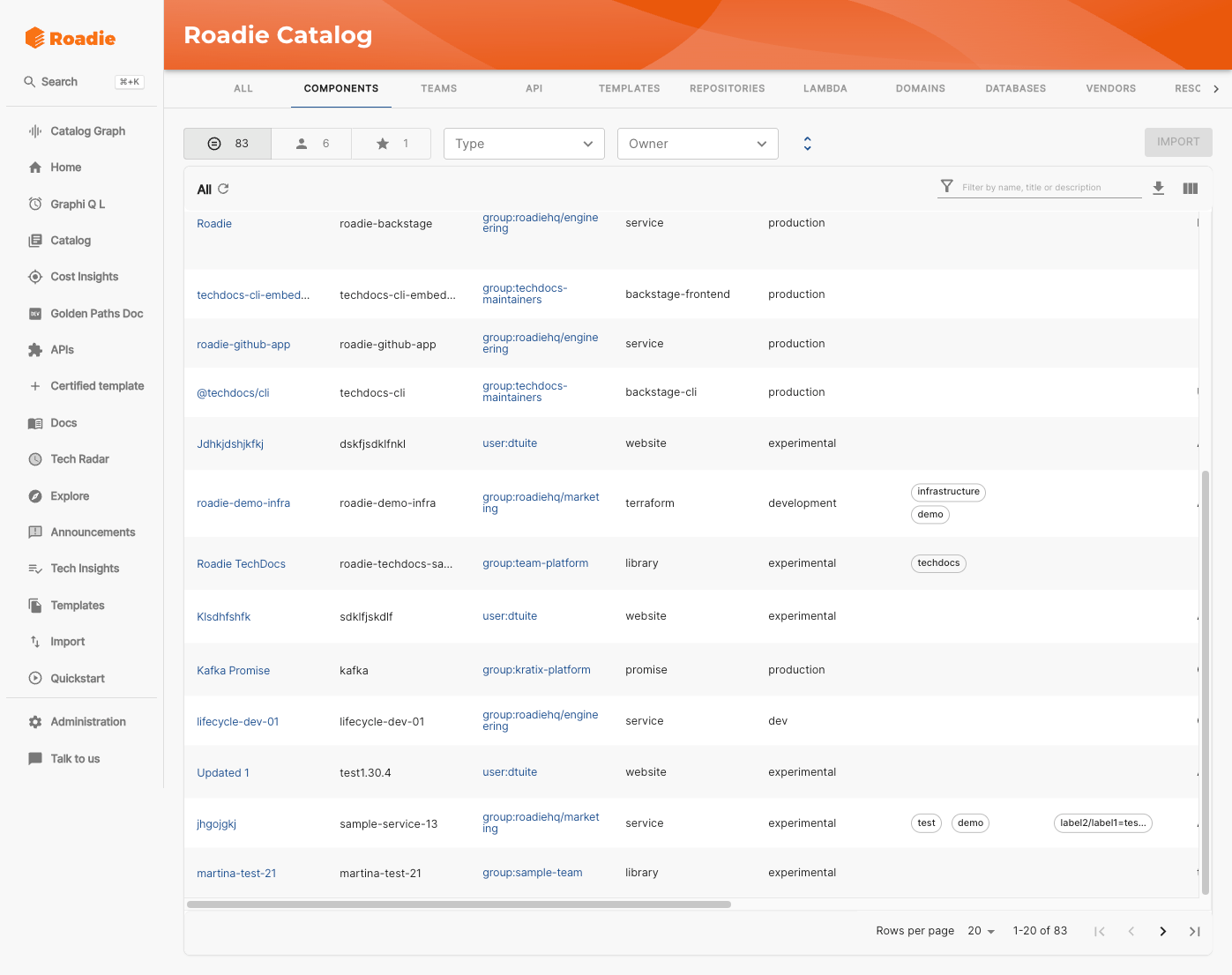
Catalog pagination becomes an absolute necessity as the size of the catalog increases
Background job isolation
In open source Backstage, long running tasks often share a process with the user facing API. TechDocs builds, scaffolder jobs, scorecard computations, data ingestions and so on can all compete with login and catalog requests.
We pulled the heavy backend work out into separate worker containers. That improves stability and reduces resource contention, but it also means you now have to design and operate a small distributed system: one set of pods serving interactive traffic, another running asynchronous jobs, plus the plumbing to schedule, observe, and scale those workers safely.
Effort wise, a reasonable baseline is one to two days for the Backstage specific configuration and app construction, plus at least a few more days for the infrastructure work. All told, expect a small team to spend a week or two on this.
Deep stability work
On the way to running multi tenant Backstage, we have spent a lot of time on the unglamorous work: memory leaks, readiness probes that misreport their status, and so on. Examples include fixing global arrays that never stopped growing, ensuring in memory caches actually drop expired items, and tuning Kubernetes probes so that pods are only marked ready when they really are.
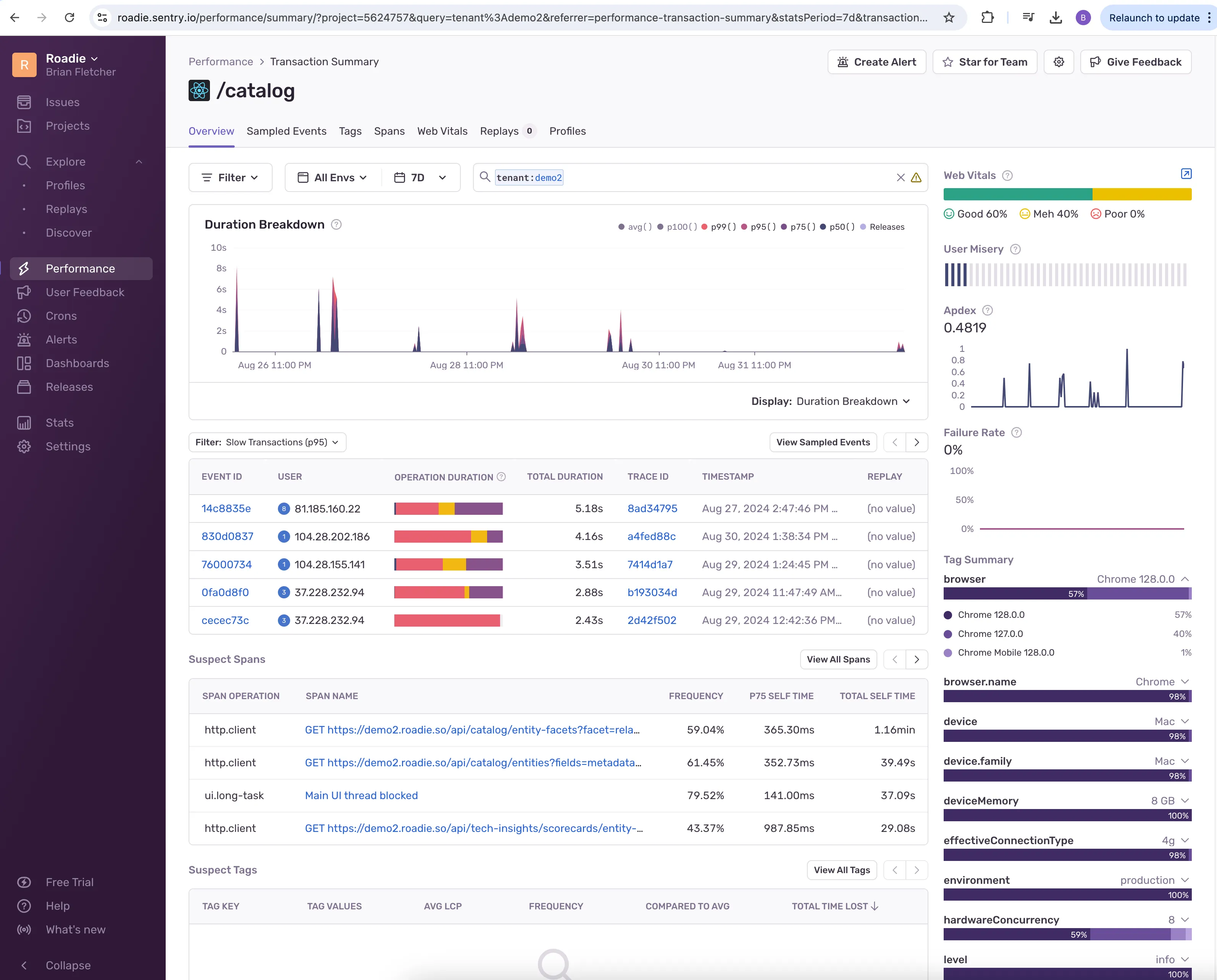
Tenant performance is meticulously logged and continually optimized
These are the bugs that only show up after weeks of production traffic. If you self host, you need to plan for that kind of ongoing investigation with profiling, heap dumps and careful rollouts.
Factor in at least a couple of engineering weeks time off the bat to ensuring all your infrastructure is properly profiled and optimized, and several hours per month of monitoring to ensure everything is running smoothly.
Scaffolder scalability: popularity changes the problem
The Backstage Scaffolder is easy to run when usage is low, but once it becomes the default way engineers create services and automate workflows, it turns into a workflow you need to manage. Scaling isn’t just “add more pods” - it’s making sure you can absorb bursts without the rest of Backstage slowing down, separating template execution from other traffic, and having enough visibility to support it day to day with an understanding what’s running, what’s queued, what’s stuck, what’s failing, and why.
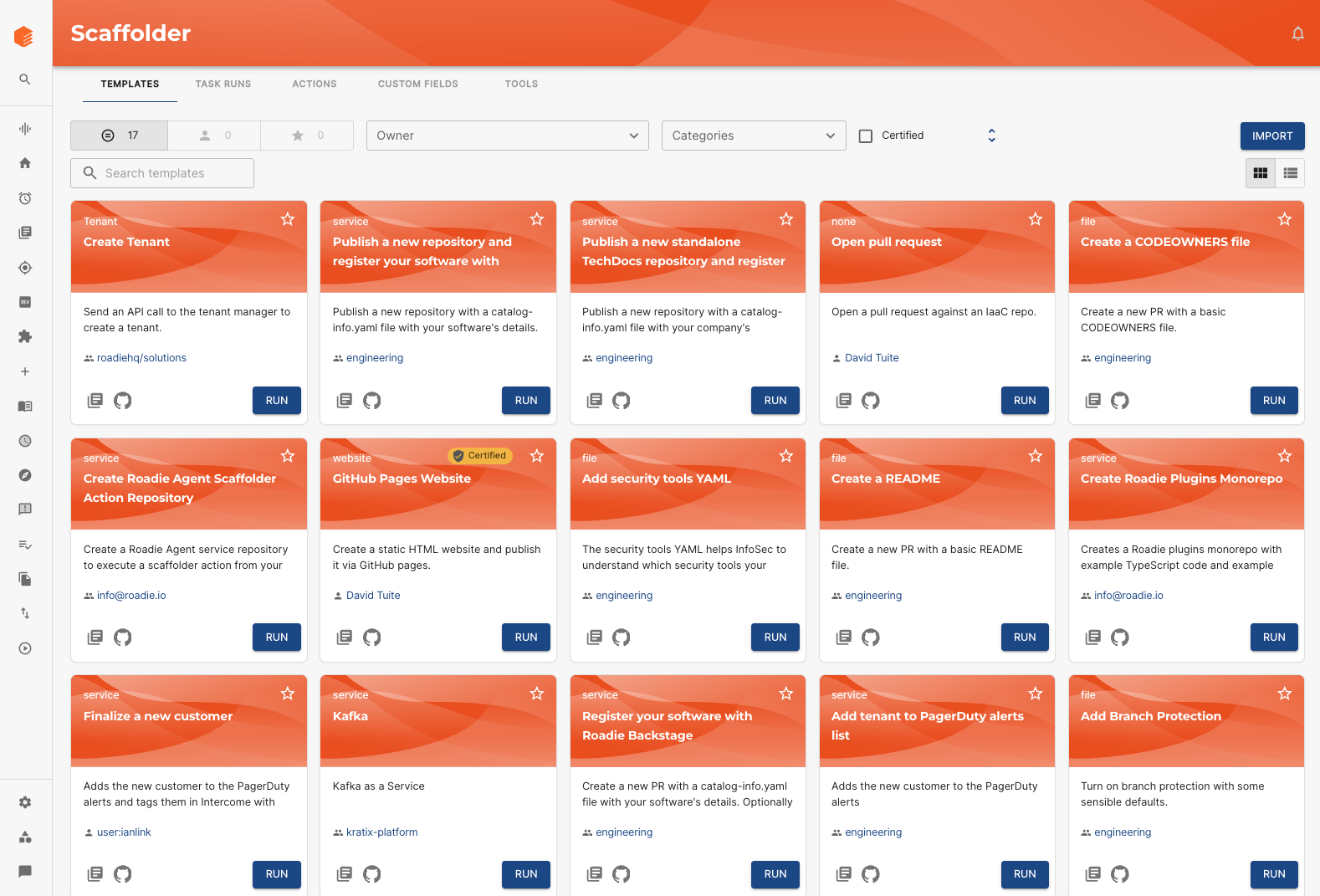
The Scaffolder as a production workflow engine
Preloading, caching and endless optimizations, frontend and back
On the frontend we made numerous changes to how Backstage handles content. This includes optimizing API calls, ruthlessly culling what is loaded, and optimizing how we serve static content such as TechDocs.
In the backend we added visibility and controls around the job scheduler, because once your tooling grows and you’ve got multiple ingestion refreshes, scorecard jobs and TechDocs builds, it is easy to end up with invisible backlogs that impact performance.
 Roadie’s scheduler view showing background jobs across the instance
None of these changes is individually complex, but together they form the difference between “Backstage mostly works” and “Backstage feels fast even on a Monday morning with thousands of users.”
It’s challenging to reliably estimate this effort; but even at the lower end for a smaller catalog expect to sink multiple months worth of engineering effort into optimization for Backstage. For us, obviously with multiple Enterprise customers that makes sense to invest the time - for an individual team it’s a challenging cost-benefit discussion to make work.
2. Catalog customization and data modeling
Backstage’s catalog is designed to be endless flexible and extensible, but in practice organizations quickly run into the limits of pure YAML in git.
Over time we have had to turn the catalog into something that behaves more like a product, both in terms of how it’s populated, and how it’s used and consumed by users and services.
Custom columns, tabs and views
Platform teams want to surface critical metadata directly in the catalog table: criticality, lifecycle, tier, compliance score, owner health, and so on. We built configurable catalog columns that can display arbitrary metadata, numeric scales, links and even scorecard results, along with the ability for users to save filtered views as tabs.
Replicating this means building a more dynamic catalog UI and a way to define, persist and share those views. The alternative is endless “export to CSV and slice in a spreadsheet” workflows, which ultimately defeat the purpose of an IDP.
This was one of the most useful features we’ve built for Roadie, and there’s hundreds of hours of engineering effort behind the work.
 Custom tabs in action - a must have for the more mature catalog
Decorators and “glue of truth”
Real organizations almost never have a single source of truth. Teams want to combine data from git, SSO, HR systems, cloud providers and ad hoc spreadsheets.
We built the Decorator as an entity decorator, and the Fragments API, which allow extra metadata to be stored in Roadie’s database and merged into entities at runtime, without changing the YAML. That is the foundation for things like business ownership, cost centre tags, custom maturity ratings, and so on. The Decorator works in the UI, while the Fragments API achieves the same thing programmatically.
 Skip the YAML - decorate entities with metadata from within the Backstage UI
If you self host, you will need your own answer for how to enrich entities from multiple systems without forcing every change through a pull request. What we’ve learned from experience is that trying to batch annotate entities via organization-wide PRs is unlikely to succeed, hence, empowering the platform teams to decorate these entities at the IDP level. Factor on at least two months of engineering investment to make the data model changes, build the logic and UI elements.
Repositories, products and custom kinds
Very quickly people want to catalogue more than just “services.” They want to represent repositories, shared libraries, products, data models, infrastructure resources and more.
We have added new kinds such as Repository and Product, plus guidance and tooling for extending the entity model safely. Doing this yourself means working with Backstage’s schema system, updating layouts and cards, and then thinking about how all of this will be queried and shown in search.
These are some of the more foundational and impactful changes, and are in the Backstage scheme of things, on the simpler side. Factor on 40-60 hours for the changes to the data model schema and building the custom processor.
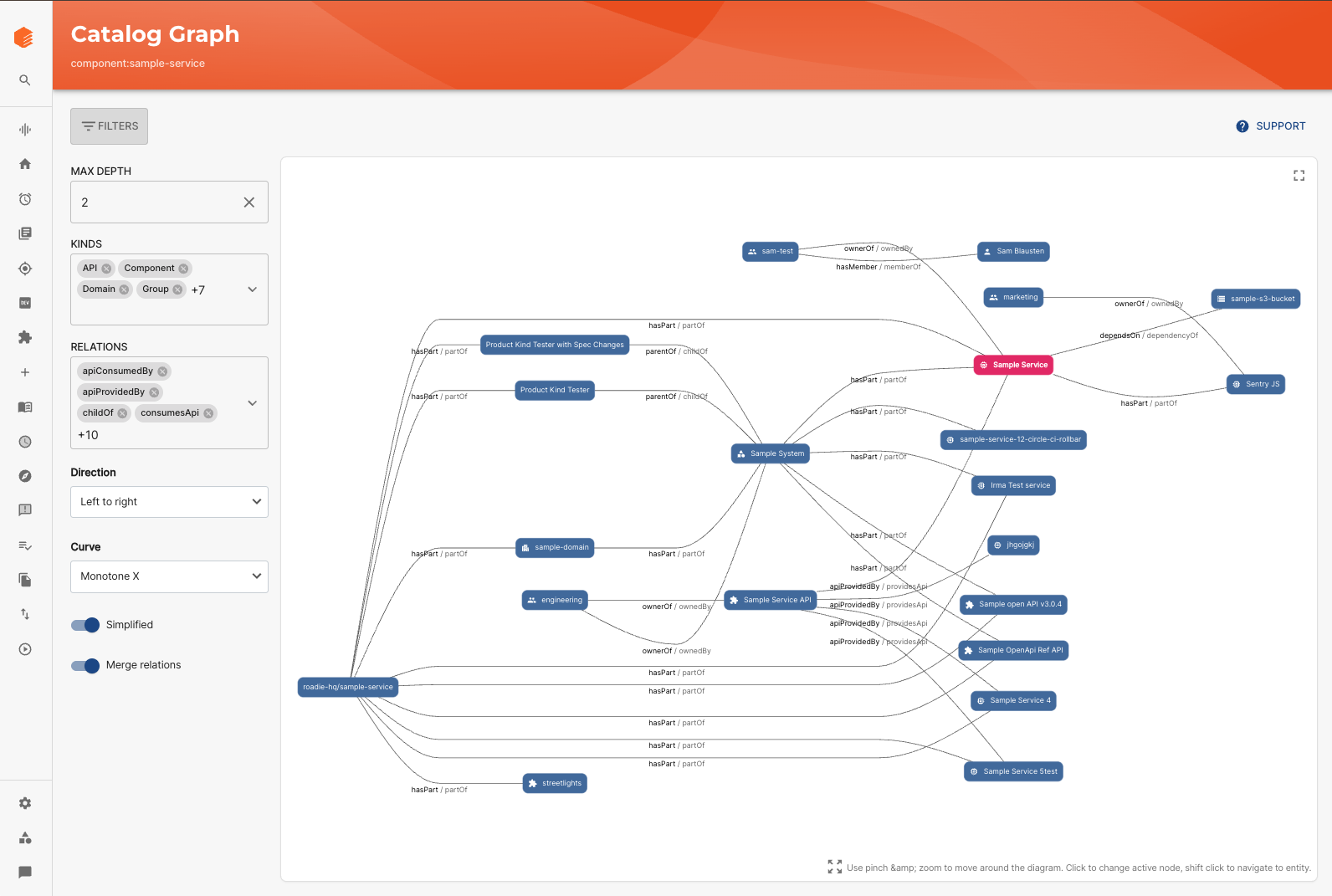
Richer kinds unlock richer relationships: the catalog graph is one way to visualize how services, repos, and products connect
Instant updates and completeness tracking
The catalog is a living thing, and it’s important it stays fresh. As usage grows, you will want more control over how your catalog is refreshed, in an idempotent way, from your underlying systems. We use webhooks and APIs from SCM systems to trigger catalog refreshes in near real time, and we track catalog completeness using scorecards that measure ownership, labels and other metadata.
A self hosted team will need some equivalent if you want to trust the catalog as a real time view of your software. Factor on a month or more to get this done.
3. Search: how people can actually find things
Search is one of the most visible parts of a developer portal. If it feels off, people give up quickly. Open source Backstage has gradually improved search, but we found that large organizations quickly needed more than the out-of-the-box search experience.
A real search engine
We moved to OpenSearch for search, with analyzers that handle mixed case names, hyphenation, and partial matches. For example, engineers can type part of a service name, or a fragment of an API route, and still find what they need. This is not the case for out-of-the-box self-hosted Backstage.
That work required running and maintaining a search cluster, setting up indexers, and designing relevance rules. It also meant a pass over search UX, so that results are presented in a way people can actually work with. This can take anywhere from 2-3 months depending on the level of customization required.
AI search
A recently addition, but a critical one - we now make available our MCP tooling to a built-in AI assistant in the Roadie UI. This allows engineers to ask natural language questions about their catalog and have the answers displayed in Roadie. A step change from regular search, and a similar order of magnitude in terms of engineering effort. The real investment here was in the addition of MCP tooling, but factor on a couple of weeks at least here.
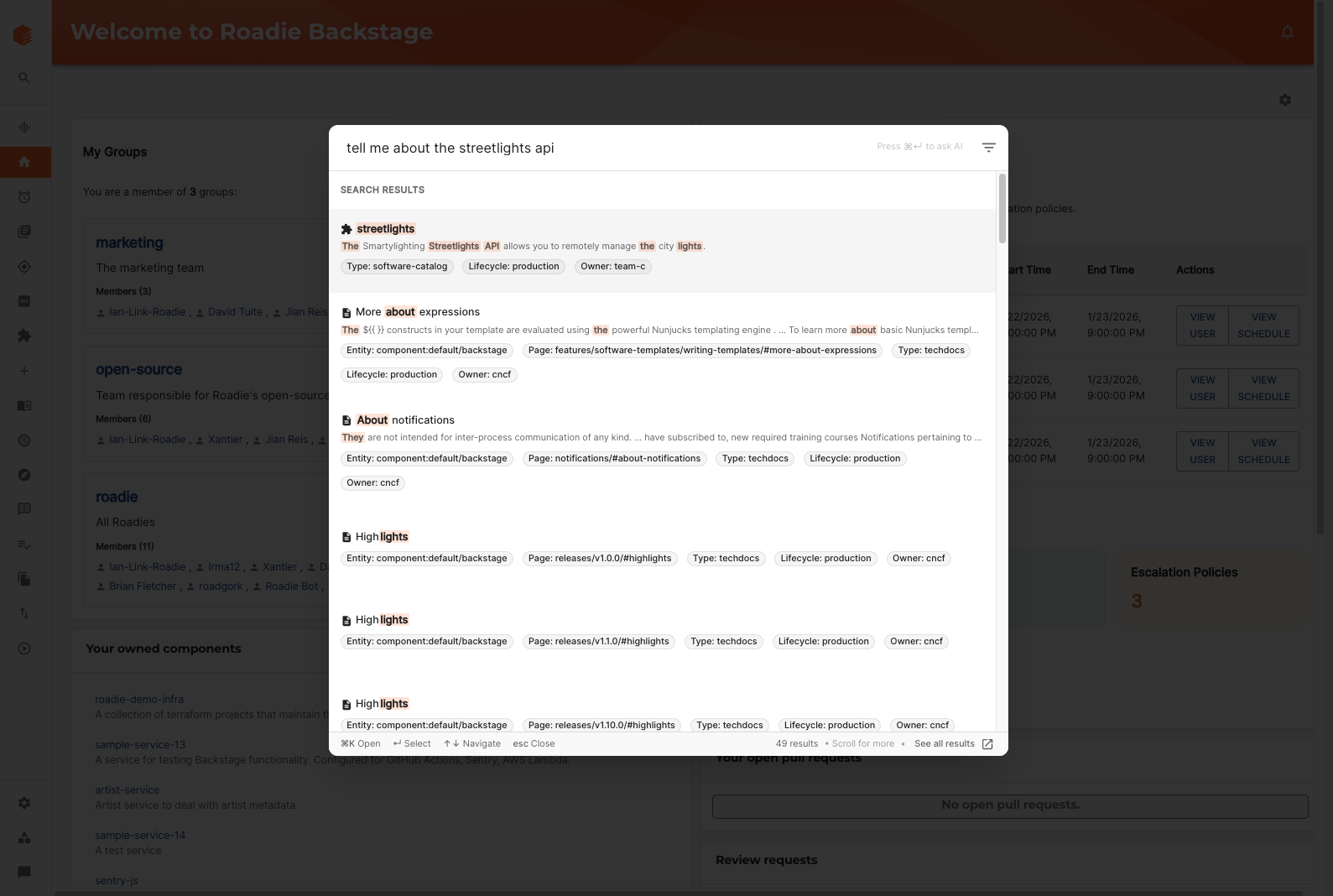
AI search uses the same MCP tooling to expose a richer, conversational search experience
4. Plugins and integrations: owning the long tail
Backstage’s plugin model is its greatest strength and one of its sharper edges.
Most large organisations end up using a long list of plugins: Argo CD, AWS, Azure DevOps, GitLab, Jira, Datadog, Sentry, SonarQube, security scanners, incident tools and more. Each of those brings its own authentication quirks, rate limits, API changes and version compatibility issues.
Over the last five years we have:
- Maintained and updated dozens of plugins when Backstage core moved forward or vendor APIs changed
- Built new plugins such as AWS resource ingestion, Wiz security integration, LaunchDarkly enhancements, Shortcut integration and more
- Created a secure connectivity pattern with Snyk using an open source broker to reach on prem systems without opening inbound access
If you choose to self host, the integrations you rely on today will keep evolving. The work is less about “install plugin X once” and more about “own a small product surface for each plugin indefinitely.”
That is not a reason to avoid self hosting, but it is a cost you should be explicit about.
5. Tech Insights and scorecards: turning Backstage into a governance tool
Most organizations adopting Backstage eventually want more than a catalog. They want to use it to drive standards: security adoption, SLO coverage, migration progress, documentation quality, and so on.
Open source Tech Insights gives you some primitives, but it expects you to write a lot of the logic and UI yourself. We turned that into a full product, and it was a six-month engineering lift from a fairly substantially sized engineering team. Factor on at least the same for your own efforts to make Tech Insights into a fully-featured product. Here’s what we’ve built:
A no code scorecard builder
Platform teams can define checks and scorecards in a UI. Under the hood, data is pulled from SCMs, CI, security tools and other sources, stored as facts, and evaluated regularly. We ship a large library of built in checks so that people do not start from a blank page.
Aggregation, history and reporting
Results are rolled up by team and group, graphed over time, and shown either on a dedicated Scorecards section, and/or directly on entity pages and in the catalog. That lets you answer questions like “which team is lagging on SAST adoption” or “how has our documentation coverage changed over the last quarter.”
To replicate this yourself you will need to implement three things: a data ingestion layer, a rule engine, and a UI that surfaces all of it in Backstage. It is very doable, but it is also a multi month engineering effort.
 Tech Insights scorecards in action, turning standards into automated checks across your entire software catalog
6. RBAC, security and governance: controlling who can do what
Once you have real adoption, permissions move from “nice to have” to “non negotiable.”
Backstage’s permission framework is flexible, but it does not ship with a full RBAC system out of the box. Building a full RBAC product (roles, admin UI, policy engine, tokens) is typically a six month effort for a small two-person team. We had to build:
Fine grained roles and permission policies
We support custom roles, mapping from identity provider groups to roles, and a policy engine that can express rules like “owners of a service can edit it, others can only view” or “only this group can run these templates.” That is exposed through an admin UI rather than code.
API tokens and service accounts
To allow automation and external tools such as MCP clients, we added API token support tied into the same permission system. That means designing token issuance and revocation flows, and making sure tokens are not a back door around your RBAC rules.
7. TechDocs: documentation without the pain
Docs like code is one of Backstage’s most attractive features, but it can be surprisingly hard to operate in anger.
Problems tend to show up over time: builds that are slow or flaky, large monorepos that generate huge docs sites, Markdown features that people expect but are not configured, and so on.
We addressed this with:
Hybrid build modes
Teams can choose between on demand builds or CI based publishing to a shared bucket. For large or frequently accessed docs, CI publishing gives much better performance.
Autodiscovery and webhooks
When a docs folder changes in git, webhooks trigger a rebuild in the background so that by the time someone opens the page, the new version is already there.
A curated MkDocs environment
We ship a standard set of MkDocs plugins and extensions for diagrams, tabs, admonitions and monorepos. That saves teams from having to build their own MkDocs image and solve the compatibility problems that come with it.
None of this is conceptually complex, but if you skip it you can easily end up with TechDocs that are slow, unreliable, or underused.
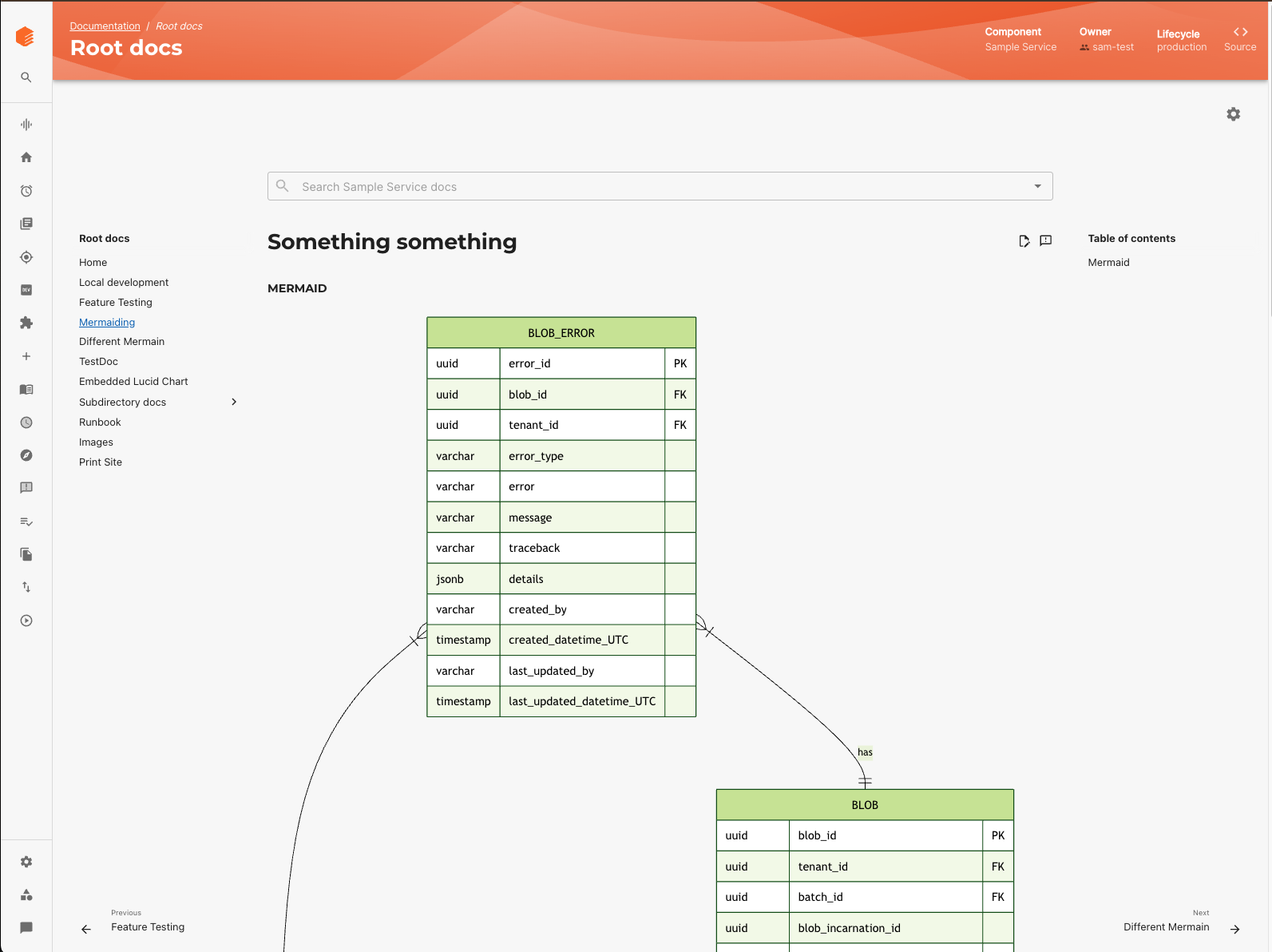
TechDocs pages rendered in Backstage, powered by MkDocs and a build pipeline running behind the scenes
8. Developer experience improvements
Developers judge a portal by how it feels in day to day use.
A lot of our work has been on the small things: catalog table layout, sticky filters, configurable columns, a useful homepage, sensible defaults for layouts, certified templates, better error messages, and an admin area that is navigable when you have dozens of integrations.
On top of that we are experimenting with new ways to let teams extend the UI quickly, such as MDX based homepage cards that can fetch and present data without building a full plugin. The direction here is to give engineers “power tools” so they can shape the portal around their workflows.
If you self host, this is the kind of work that rarely makes it onto a roadmap, but that strongly influences whether people actually enjoy using Backstage.
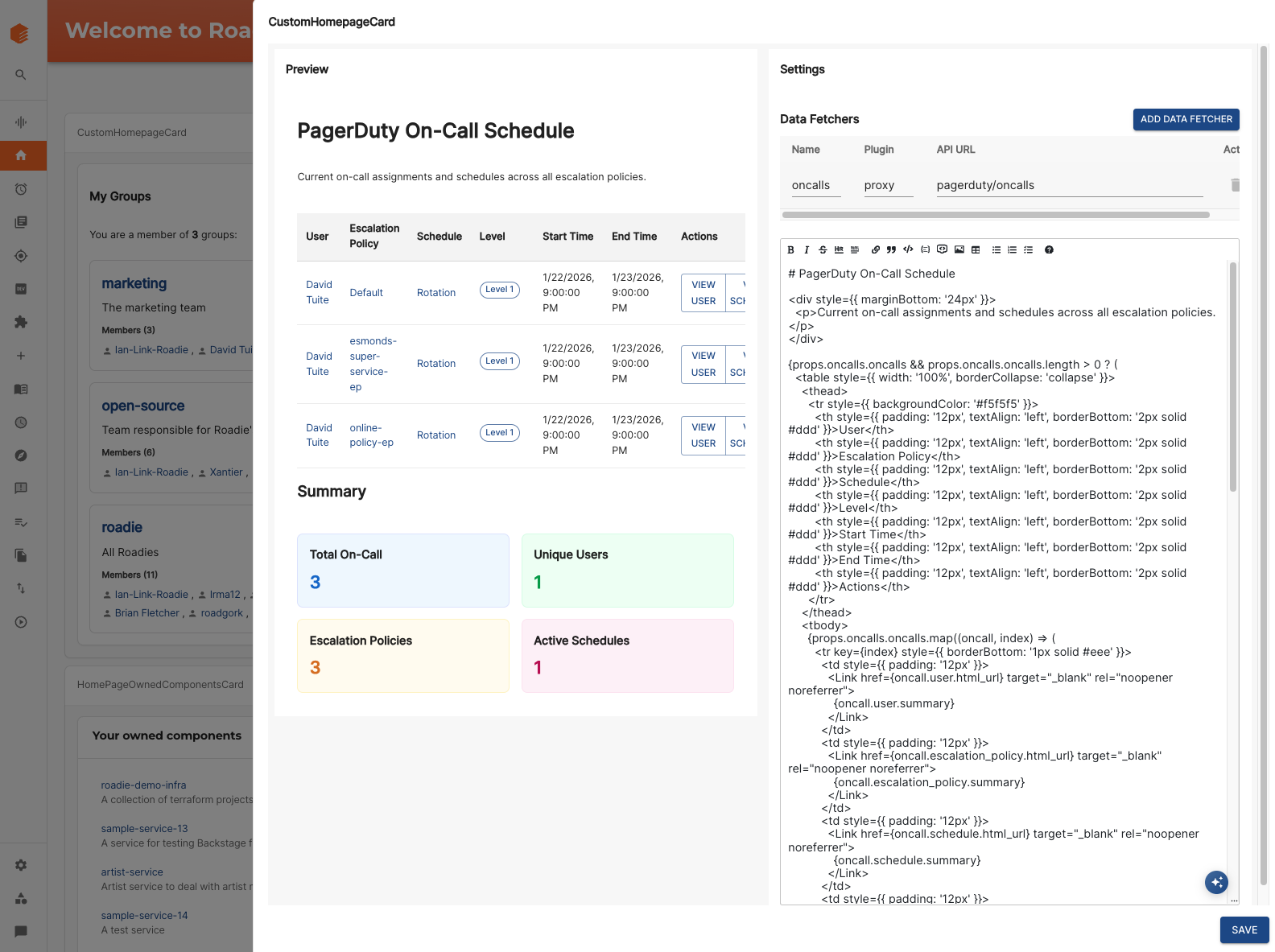
Homepage cards - a quick and easy way to expose information from internal and external APIs in Roadie
9. AI and MCP: the next layer
Finally, there is AI.
We touched on this under search - having an AI assistant that can answer questions about your documentation and catalog, and we have implemented Model Context Protocol servers so that external AI tools can safely talk to Roadie’s APIs. That allows agents in editors to discover templates, understand APIs and query scorecards, all through Backstage as a system of record.
You do not need AI on day one of a self hosted journey. It is, however, part of where the ecosystem is going. If you want Backstage to be a first class participant in your AI tooling, you will likely need to invest in similar capabilities: embeddings, vector storage, permission aware retrieval, and APIs tailored for LLM clients.
10. Saving the best for last - upgrades
If there is one topic that consistently surprises teams adopting Backstage, it is the upgrade burden.
Standing up Backstage for the first time is the easy part. Keeping it running, stable, secure, and compatible with the fast-moving upstream project is where the long-term work lives. Backstage releases frequently. Plugins evolve independently. Breaking changes land often and sometimes without much warning. And because Backstage is a framework rather than a product, the blast radius of every change is potentially wide.
Backstage moves fast
Backstage core typically publishes new releases every few weeks. These releases regularly include:
- Deprecations or removals of catalog processors or entity fields
- Changes to authentication flows and permission boundaries
- Scaffolder API changes
- Search backend rewrites
- Plugin architecture changes (backend plugin framework migration, for example)
If you fall behind, the upgrade path compounds. A one-version bump is manageable. A six-month gap can become a multi-week project.
Plugins evolve at their own cadence
Each plugin (Datadog, Argo, GitHub, Jira, TechDocs, API Docs, AWS, Azure, Wiz, LaunchDarkly, and dozens more) sits on top of Backstage but is not coordinated with it. They evolve independently, and breaking changes in one can cascade across your installation.
A self-hosted team effectively ends up with a plugin garden, each with its own update cycle, bug behavior, API quirks, and upstream issues.
The systems we had to build to keep this sustainable
After years of running Backstage in production, we realized that upgrades needed as much engineering investment as performance or catalog work. We ended up building test suites that run Roadie’s full plugin surface against new Backstage versions before anything reaches customers. This catches breakages early and reliably.
We also never upgrade every tenant or environment at once. Rollouts happen gradually, with internal test tenants and rollback paths if something unexpected happens.
When something does break (and it often does) we have documented processes for diagnosing plugin failures, dependency mismatches, deprecations, and migration regressions, and clear steps for rolling forward or back safely. There’s also the experience that comes from having done this for years across multiple versions - hard won experience that allows our team to quickly triage and resolve highly-specific Backstage issues.
These systems collectively represent hundreds of hours of engineering time. They exist because without them, upgrades would regularly break real customer portals.
The hidden cost: this work never ends
This is the part people most often underestimate. Upgrades are not a one-time project. They are ongoing rent Every new Backstage release, every new plugin version, every upstream API deprecation requires attention.
Self-hosting teams often start enthusiastically, then gradually slow down as the backlog of breaking changes grows. Eventually they end up frozen on an old version, unable to upgrade without major intervention.
Why this matters for your roadmap
If you plan to self-host Backstage, you need to view upgrades as a primary, recurring body of work, not a background task. The cost lives in:
- Testing every combination of plugins and Backstage core on every upgrade
- Managing breaking changes across dozens of moving parts
- Keeping your team aware of upstream changes and migration guides
- Avoiding drift so upgrades remain tractable
- Making sure your internal plugins and catalog processors don’t fall behind
- Ensuring that upgrades don’t take down developer workflows
This is not a warning; it’s a reality. Many teams can absolutely do this. But you should plan for it with eyes open. If there is one lesson from the State of Backstage report, it is this: upgrades are the number one pain point for self-hosters. Not performance. Not TechDocs. Not plugins. Upgrades.
Bringing it together: a realistic roadmap
Taken together, the list above is long. That is the point.
Self hosting Backstage is not simply about standing up a Node process and pointing it at your git repos. It is about:
- Operating a complex web application with many background jobs and external dependencies
- Owning a growing set of plugins and integrations and keeping them healthy
- Deciding how you will model your organisation and software, and then enforcing and evolving that model (we provide extensive engagement and support here through a structured onboarding and ongoing Customer Success motion)
- Providing governance through scorecards and permissions, not slide decks and spreadsheets
- Smoothing the user experience enough that engineers actually want to use the portal
- Keeping up with upstream Backstage changes and broader trends such as AI
- Upgrades. Friction around keeping your Backstage instance up-to-date with the upstream upgrades is a major, major source of pain for self-hosters.
None of this is impossible. Many of our customers could build a lot of it themselves, or did, before migrating to Roadie. Hundreds or thousands of organizations are successfully hosting their own Backstage implementations.
The question is not “can you,” but “which pieces do you want to own, and how much time do you want to commit.” Every engineering hour spent on an upgrade, or an enhancement already offered by Roadie is an hour not spent on improving developer experience, or custom plugins that unlock real value for your internal users. It’s a question of opportunity cost.
Roadie is far more than a hosted wrapper for Backstage - we offer production-grade infrastructure and enhancements that address fundamental gaps in security, governance, performance and developer experience that organizations that want to self-host would inevitably need to replicate.
If you decide to continue your journey on self hosted Backstage, we hope this roadmap helps you plan that work with eyes open. And if you prefer to have someone else carry this complexity for you, that is the role Roadie continues to play: a production grade distribution of Backstage, shaped by years of learning across many organizations. Feel free to request a demo anytime.
