
Your AI triage agent fires on a P1 alert for payment-service and returns output that could describe any service at any company: check resource utilization, inspect recent deployments, verify upstream dependencies. The on-call engineer reads it, dismisses it, and goes back to the runbook they already know.
When an AI agent fails on an engineering task, the root cause almost always traces to missing grounding data. The agent didn't know that payment-service is owned by the Payments team, that a config change deployed 47 minutes before the alert fired, that this service has had three P1 incidents in the past 30 days all traced to the same upstream rate limit, or that the runbook specifies checking Ledger API response codes before anything else. That data lives inside your organization, and the agent's access to it was the limiting factor in the quality of its response.
That missing data is what context engineering frameworks call the knowledge layer, which is the information an agent needs beyond its instructions and tools. Most frameworks, such as Galileo's analysis , are designed for general-purpose agents. Engineering needs a more precise taxonomy. Five specific categories determine whether an agent produces useful output in your environment:
- Service ownership and topology
- Deployment and runtime state
- Incident and on-call history
- Tech standards and scorecards
- Documentation and runbooks
All five already exist inside most engineering organizations. The problem is that they're scattered across disconnected tools with no structured, queryable layer connecting them.
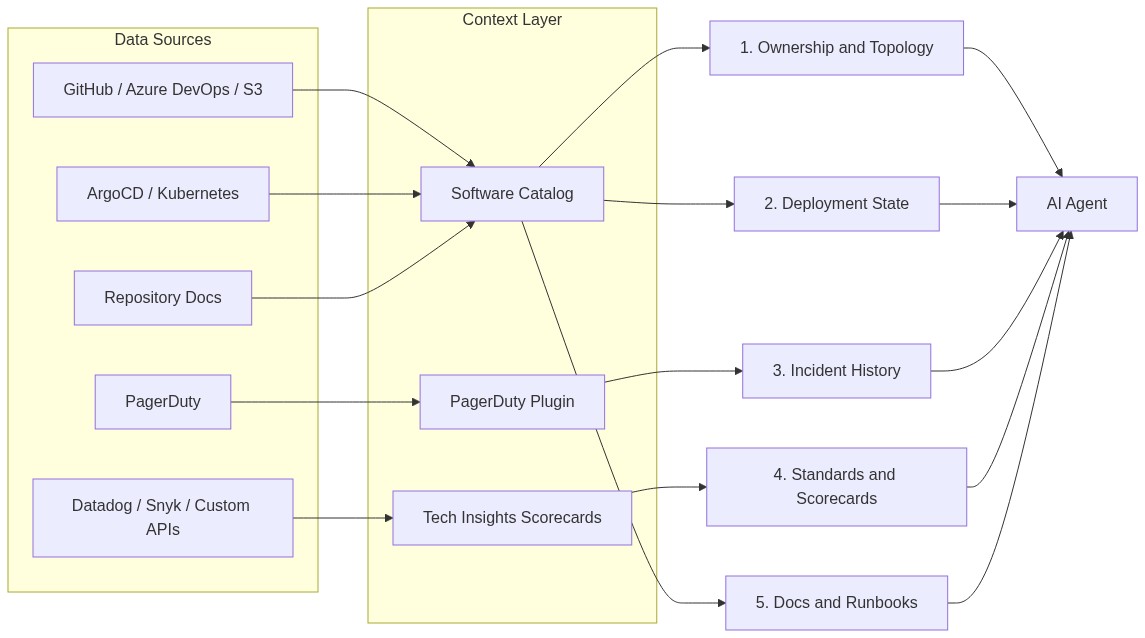
Context Type 1: Service Ownership and Topology
A complete ownership record for a service includes the owning team, primary repo URL, SLA tier, lifecycle status (production, deprecated, or experimental), direct upstream and downstream dependencies, and the entity relationship graph connecting the service to every resource it touches. An agent needs all of these fields to produce useful incident responses.
During incident triage, ownership context determines the scope of what an agent can do. An agent with the full entity graph for payment-service can identify that checkout-api and invoice-service both depend on it, confirm that fraud-detection shares the same database cluster, and route the escalation to payments-eng with the correct on-call handle. Without that graph, the agent scopes its analysis to the single service it can see, misses the two downstream services already beginning to degrade, and routes the alert to whoever is listed in a stale Slack channel description.
Roadie's Software Catalog stores this data in a machine-readable entity model. A catalog-info.yaml file captures the owning team in spec.owner, the lifecycle in spec.lifecycle, and the dependency graph in spec.dependsOn. The catalog ingests these files automatically from GitHub, Azure DevOps, Bitbucket, and AWS S3, then exposes the full entity graph via the catalog API. The EntityMetadataCard surfaces any field from catalog-info.yaml on the entity's page, and the catalog API lets an AI agent retrieve the complete ownership record using the service identifier as the query key.
apiVersion: backstage.io/v1alpha1
kind: Component
metadata:
  name: payment-service
  labels:
    sla-tier: p1
spec:
  type: service
  owner: payments-eng
  lifecycle: production
  dependsOn:
    - component:fraud-detection
    - component:ledger-service
With dependsOn populated, an agent doing blast radius analysis can traverse the entity graph programmatically rather than guessing at service relationships.
Context Type 2: Deployment and Runtime State
Deployment and runtime state covers the version currently running in production, what changed in the most recent deploy and when, current pod and container health across environments, rollout status (is a deploy still in flight?), and environment-specific config values. Unlike ownership data, this information goes stale fast: a 24-hour-old ownership record is likely still accurate, while a 24-hour-old deployment state may have been invalidated multiple times.
The failure mode is predictable. A remediation agent that recommends rolling back payment-service without knowing a rollback is already executing in ArgoCD will attempt to trigger a second rollback that conflicts with the first. An agent that pulls staging config instead of production config will recommend actions that are valid in the wrong environment. Stale or missing deployment context turns a remediation agent into one that worsens incidents.
Roadie's ArgoCD and Kubernetes plugins surface per-entity deployment state directly on each entity's page in the Software Catalog. The plugins show the current application sync status, the running image version, and any recent sync events. The PagerDuty plugin's Deployment History and Change Events tab links PagerDuty change events to the service entity, giving agents a timestamped change log co-located with the ownership record. An agent querying the entity for payment-service gets ownership, current deployment status, and a timestamped list of recent changes from a single structured source.
Context Type 3: Incident and On-Call History
Incident and on-call history includes active incidents per service, historical incident count and MTTR broken down by time window, the current on-call assignee, the escalation policy, and links to past postmortem documents tied to the service entity.
Historical incident data enables your agent to recognise patterns at the service level. An agent doing triage that can read "this service has had 4 P1 incidents in the last 30 days, all resolved by restarting the upstream rate-limit service" generates a much more useful response than an agent that sees only the current PagerDuty alert. Pattern-aware triage skips the generic diagnostic steps and goes directly to the probable cause.
The Roadie PagerDuty plugin makes this data available per entity. To set it up, navigate to your tenant's PagerDuty administration page (Administration, then the PagerDuty configuration section), enter your API token, save, and apply. Then add the pagerduty.com/integration-key annotation to each service's catalog-info.yaml:
metadata:
  annotations:
    pagerduty.com/integration-key: <your-integration-key>
Once the annotation is in place, add the EntityPagerDutyCard to the component's Overview page by clicking the gear icon, then the plus icon, and searching for the card by name. The card surfaces the current on-call assignee, active incidents, incident history, and recent change events directly on the entity page. The service identifier acts as the common key between the catalog entity and the PagerDuty service, so the agent query stays simple, and the data returned is always scoped to the right service.
Context Type 4: Tech Standards and Scorecards
Tech standards and scorecard context is structured pass/fail compliance data: Does this service have a runbook defined? Is it running on a supported runtime version? Does it have observability configured? Is the on-call rotation active? These are verifiable facts about each service stored as named checks with boolean results and timestamps, retained historically and queryable the same way you'd query ownership or deployment state.
Roadie’s Tech Insights Scorecards provide the primary structured source for this context type. The system operates on a three-layer model. Data sources ingest facts from external systems (GitHub, Datadog, Snyk, PagerDuty, or any REST API you configure). Checks evaluate those facts against a pass/fail rule, for example, "runbook URL is defined in catalog-info.yaml" or "Node.js version is 18 or above." Scorecards group related checks into a named compliance target applied to a defined subset of entities, such as all production-tier components.
This unlocks two concrete agent use cases. A code review agent with access to scorecard results can surface compliance failures as blocking comments: if payment-service is flagged "check failed: no SLO defined," the agent makes that a required pre-merge action instead of a suggestion a developer can ignore. An onboarding agent can tell a new engineer exactly which of their team's services fall below the production readiness threshold, with the specific failing checks attached, rather than pointing them at a wiki page and hoping.
Context Type 5: Documentation and Runbooks
The scope of documentation and runbooks context covers operational runbooks ("how to restart this service safely under load"), architecture decision records explaining design rationale, API contracts, and a brief "why this service exists" attached to the service entity. Agents need higher-quality documentation than humans: a human can use their judgment to avoid an outdated runbook, but an agent will follow it and recommend a deprecated procedure with full confidence.
Two properties make documentation useful for agent retrieval. First, every document must be tied to an owning entity, so an agent can retrieve the correct runbook using the service identifier as the key rather than doing free-text search across an unstructured wiki. Second, the document needs a freshness signal: a runbook with a last-reviewed date 18 months ago is a liability for any agent that has no mechanism to discount its own confidence based on document age.
TechDocs, built into the Roadie catalog, co-locates documentation with the service entity that owns it. When an engineer navigates to payment-service, the TechDocs tab renders the service's operational documentation pulled from the same repository as the code, with commit history providing the freshness signal. Entity pages also support structured links and labels, so an agent can retrieve the canonical runbook URL alongside the ownership record, the on-call assignee, and the scorecard results in a single entity query.
For this to work at scale, your documentation must live adjacent to the entity it describes, with ownership enforced at the entity level. An agent that responds with "I found the runbook at this URL, it's owned by payments-eng, and the last commit to that file was six days ago" is producing a citable, auditable response. An agent that retrieves a Confluence page via keyword search can't attach any of that provenance to its recommendation.
Your Context Layer Audit
Your organization already has all five context types. What's often missing is a structured layer that makes the data queryable by service identifier rather than scattered across disconnected tools. Before adding another AI agent to your stack, run this audit to find out where the holes are.
- Query the Software Catalog for the service. Confirm that
spec.owner,spec.dependsOn,spec.lifecycle, and your SLA-tier labels are all populated and accurate. - If ownership data is missing or incomplete, add or update the
catalog-info.yamlwith the owning team, dependency annotations, and lifecycle status, then commit it to the repository Roadie ingests from. - If incident history is absent, add the
pagerduty.com/integration-keyannotation tocatalog-info.yamland add theEntityPagerDutyCardto the entity's Overview page via the gear icon. Verify the card renders active incident data before moving on. - If standards compliance is untracked, create one Tech Insights data source and one check in the Scorecards interface. A minimal starting check: "Does this entity have a
pagerduty.com/integration-keyannotation defined?" Apply it to all production-tier components and treat the pass/fail results as your baseline.
Roadie's engineering context platform connects all five context types in a single queryable layer, using the service identifier as the common key across ownership, deployment state, incident history, compliance results, and documentation. The engineering context your organization has already captured, structured and queryable from one place, is what turns a capable model into an agent your engineers actually trust.
